




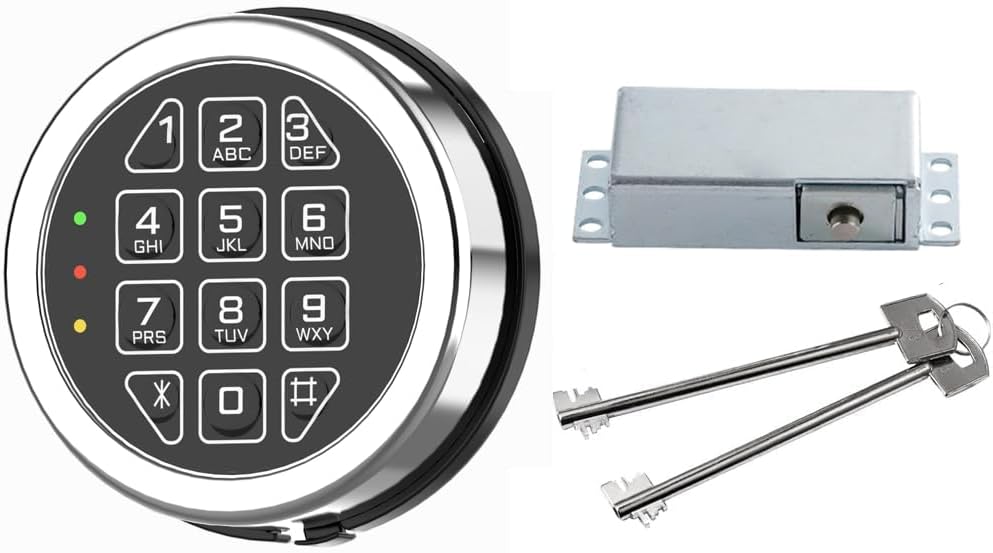
Sonew Digital Cabinet Lock with Touch Keypad Secure Electronic Coded Access for Gym School Hotel ABS Keyless Entry Ready (Installation Size L=20)

 4.3 (16 items)
 Limited Time Sale
US$54.00 cheaper than the new price!!
Free cash-on-delivery fees for purchases over $99
Product details
| Management number | 213723741 | Release Date | 2026/04/12 | List Price | US$36.00 | Model Number | 213723741 | ||
|---|---|---|---|---|---|---|---|---|---|
| Category | |||||||||
Specifications: Material: ABS Maximum installation thickness: L = 20mm, L = 30mm (Optional) Battery: 3V button cell (CR2032) (Not included) Size: 92.5 x 37.2 x 14.5 mm / 3.64 x 1.46 x 0.57 inch (appr.) Package List: x Security Lock 2 x Screws x Hex nut x Spring x Fixed Instructions: Enable public mode 1. Enter the correct management password "****+OK" key, the buzzer "di..." a beep, the unlocking light is always on. 2. Press the OK button again for more than 2 seconds, the lock flashes, press the OK button again. 3. Enter the numbers "4, 4" and press the "OK" button, "di .." a beep. Set temporary password 1. Press the OK button, the unlock indicator flashes. 2. Enter the 4~15 password to be set. 3. Press the OK button, the buzzer will beep for a time, and the lock will be opened and stored. The temporary password is set successfully. After entering the standby state, the light of the electronic lock will flash every 3 seconds. *The temporary password can only be effectively once, and it will automatically become invalid after use. Turn off public mode 1. Enter the correct management password "+OK" key buzzer "di..." a beep, the unlocking light is always on. 2. Press the "OK" button again for more than 2 seconds, the lock flashes, press the OK button again. 3. Enter the numbers "4, 3" and press the "OK" button, a beep "di...". Enable and disable false password function 1. Enter the correct management password, "OK" button, the buzzer "di..." a beep, the unlocking light is always on. 2. Press and hold the OK button again for more than 2 seconds to flash, press the OK button again. 3. Enable input "4, 2" and press the "OK" button, "di..." a beep. Close the input "4, 1" and press the "OK" key "Beep .." a beep. When the fake password function is enabled, when entering the password, you can enter garbled codes before
- Durability & Safety: Made of strong ABS material for long-lasting use with precise construction that ensures and reliability in various settings
- Convenient Access: Touch keypad password lock eliminates the need for keys providing quick and hassle-free entry with a simple code
- User-Friendly Design: Cool to use with a factory-set management password (1234) and default home mode for immediate setup and operation
- Secure Alerts: Indicator light activates when unlocked and emits a sound for incorrect entries enhancing security and user awareness
- Versatile Application: Compact and well-crafted for use in schools gyms hotels offices homes and other commercial or spaces
| Brand Name | Sonew |
|---|---|
| Manufacturer | Sonew |
| Additional Features | adjustable |
Bestseller ranking
Coffee, Tea & Espresso



Customers who viewed this product also viewed
Locks




Correction of product information
If you notice any omissions or errors in the product information on this page, please use the correction request form below.
Correction Request Form